
Voicemail detection is the classification step that decides whether a live person, a mailbox greeting, or an IVR menu answered your outbound call before your agent says a word.
The verdict lands in the first few seconds, and it sets what happens next, whether the agent starts talking, leaves a message, presses a digit, or hangs up.
If you get it wrong in one direction, the agent might pitch a recording for ninety seconds. Get it wrong in the other, and it hangs up on a customer mid-hello.
TL;DR
- What it does: Voicemail detection classifies what picked up an outbound call, then routes your voice AI agent to leave a message, navigate a menu, or hang up.
- The 2026 field: Three architectures compete. Vendor-published figures run from 94.7% overall accuracy to 98.5%, on each vendor's own audio, and verdict speed runs from 840 milliseconds to 30 seconds.
- The hard half: Getting the timing right on when the greeting ends is what keeps your message from getting cut off.
- The new wildcard: iOS 26 Call Screening answers unknown numbers automatically and asks for the caller's name and reason before your phone rings, which inflates your connect rate.
- The legal clock: on telemarketing campaigns, 47 CFR 64.1200(a)(7) treats a call as abandoned if it is not connected to a live sales representative within two seconds of the called person's completed greeting. That is your detect-and-route budget on those calls.
What Is Voicemail Detection? The 30-Second Answer
Voicemail detection is the classification step that tells an outbound voice agent whether a live person, a recording, or an automated menu answered the phone.
The verdict lands in the first few seconds, and it decides whether your agent starts talking, leaves a message, presses a digit, or ends the call.
Bottom line: Detection accuracy sets the quality of your reachability data, and detection speed sets the quality of your caller experience. Those two pull against each other.
Key Features
- A verdict with a stopwatch attached: Twilio returns an AnsweredBy value of machine_start, human, fax, or unknown, alongside MachineDetectionDuration, the milliseconds spent detecting that call.
- A tunable time budget: Twilio's detection timeout accepts any value from 3 to 59 seconds and defaults to 30. Longer windows buy accuracy and cost you dead air.
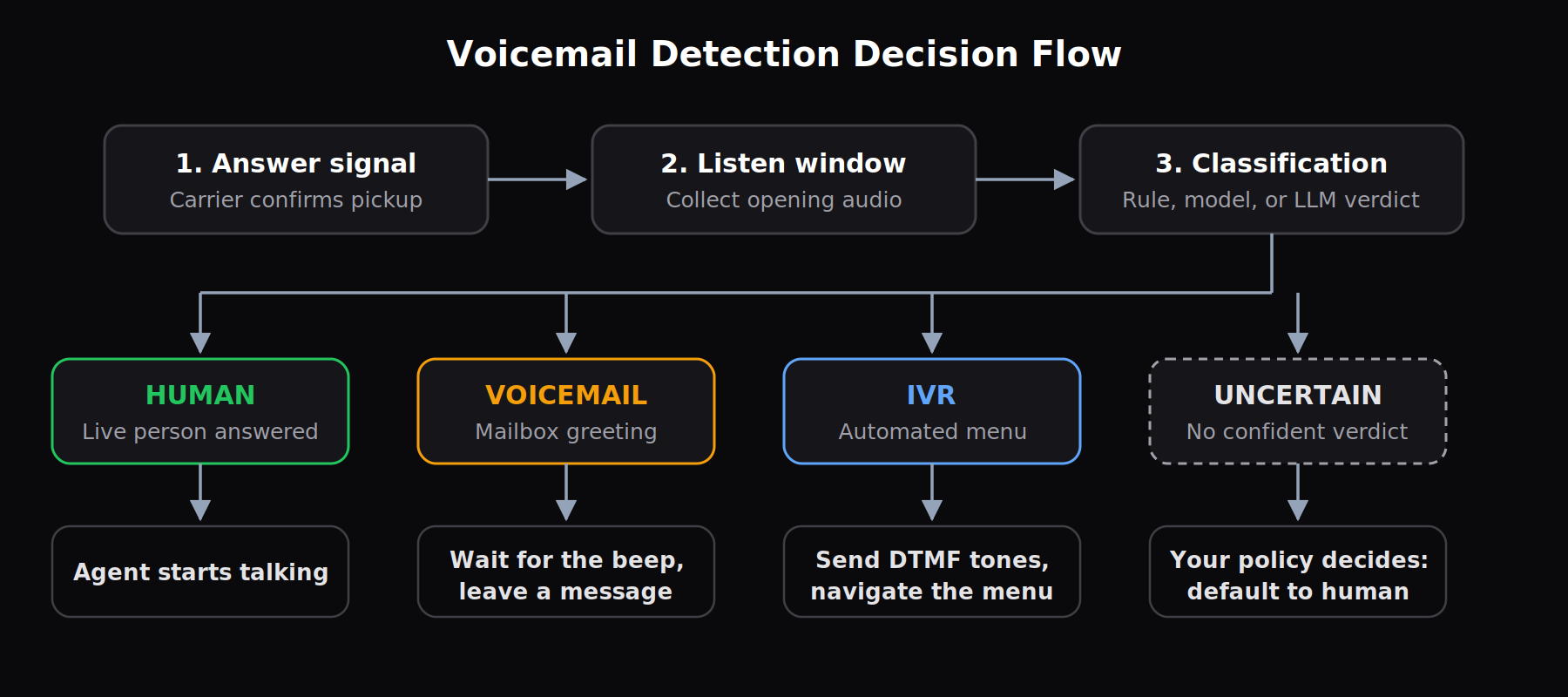
- A branch point your agent can act on: LiveKit's answering machine detection sorts every outbound call into human, voicemail, IVR, or unavailable, so your agent picks a defined behavior for whatever answered.
- An uncertain class you have to design for: Every provider ships a fallback state, and your policy for that state determines your worst-case failure, so pick it deliberately.
How Does Voicemail Detection Work?
Detection listens to the opening seconds of audio, scores what it hears, and emits a single classification. What varies across providers is the signal being scored and how long they are willing to wait.
The Detection Loop, Stage by Stage
- Answer signal. The carrier confirms the far end picked up.
- Listen window. Detection collects audio, with documented start delays between 1.5 and 3 seconds
- Feature or transcript extraction. Raw audio becomes either acoustic measurements or words.
- Classification. A rule, a model, or an LLM assigns a class.
- Emission. The verdict reaches your agent, which then greets, records, or disconnects.
The Three Detection Methods
1. Silence-pattern rules. Measure the rhythm of the greeting. Genesys Cloud treats under 2,200 milliseconds of speech followed by 700 milliseconds or more of silence as a live person. Twilio exposes the same idea as four parameters, including a 2,400 ms speech threshold and a 1,200 ms speech-end threshold.
Genesys publishes the failure case in its own docs. "Hello, this is John Smith" reads as human. "Hello, this is John Smith. Thank you for calling Widgets Inc, how can I assist you today?" reads as voicemail. In our reading, a talkative receptionist defeats the rule.
2. Audio classifiers. Score the waveform. Bland fine-tuned Wave2Vec on the first two seconds of call audio, upsampled from 8 kHz to 16 kHz, and reported 98.5% accuracy. Their four-second CNN over Mel spectrograms reached 97%.
3. Transcript plus LLM judgment. Reads the words. LiveKit reports 95.7% F1 on human, 98.2% on IVR, and 97.3% on voicemail, with a median time to decision of 840 milliseconds. Vapi pairs a Gemini classifier with optional beep detection and polls on a backoff plan with a 2.5-second floor.
Pipecat takes the same approach in open source, gating TTS output until an LLM labels the transcript CONVERSATION or VOICEMAIL, with a default voicemail response delay of 2.0 seconds.
| Method | Signal used | Verdict speed | ❌ Where it misses | ✅ Best for |
|---|---|---|---|---|
| Silence-pattern rules | Speech and pause length | 3 to 30 seconds | Long human greetings | High-volume dialers |
| Audio classifier | Waveform features | Under 4 seconds | Unseen carrier audio | Self-hosted stacks |
| Transcript plus LLM | Spoken words | Around 1 second | Silent pickups | Agent-led outbound |
The Beep Problem
Identifying a machine and knowing when to speak are two different jobs, and most documentation treats them as one.
Vapi pairs model classification with optional voicemail beep detection, and its beep wait defaults to 30 seconds because greetings commonly run 10 to 20 seconds before the tone. Set it lower and the mailbox clips your opening words.
Twilio splits its machine outcome three ways (machine_end_beep, machine_end_silence, machine_end_other) for the same reason, since plenty of systems never beep at all.
Voicemail Detection vs. Answering Machine Detection: What's the Difference?
The main difference is what each one has to decide. AMD only answers yes or no before handing off to a human rep. Voicemail detection, meanwhile, has to decide what the agent says next, on its own.
| Differentiator | Answering machine detection | Voicemail detection (agent era) |
|---|---|---|
| Question answered | Human or machine? | What picked up? |
| Signal consumed | Speech and silence timing | Audio plus transcript |
| Output classes | Human, machine, fax, unknown | Human, voicemail, IVR, unavailable |
| Typical verdict | 3 to 30 seconds | Around 1 second |
| Next action | Route to a rep | Speak, dial, or disconnect |
The winner on agent calls is model-based voicemail detection. A rule tuned on greeting rhythm has no way to separate an IVR menu from a chatty receptionist, because both produce long speech followed by a pause.
A classifier reading the words sees "press one for billing" and knows exactly which one it reached. That distinction is why outbound sales agents can now navigate phone trees they once abandoned.
Rule-based AMD still earns its place on pure connect-or-drop dialers, where the only question is whether to hand the line to a person.
The Answering Party Neither One Was Designed For
Apple's Call Screening automatically answers calls from unknown numbers, asks the caller for a name and reason, and transcribes the reply before the phone ever rings.
That entity prompts your agent for a name and a reason, and it is not your customer. Detection reads it as human because, by every acoustic and lexical measure, it behaves like one.
Answer rate climbs, connect rate stays flat, and your follow-up sequence fires on people you never actually reached. Log screener pickups as their own outcome, or your reachability data will drift for months before anyone notices.
What Voicemail Detection Gets Right and Where It Falls Short
The wins show up in your cost per connect, and the failures show up in hung-up customers and clipped messages.
Pros
✅ It recovers minutes at volume. A hang-up at second three, versus second ninety, changes your cost per connected conversation, and the saving compounds across a list.
✅ It cleans your outcome data. Without an explicit verdict, voicemail pickups and real conversations look identical in your call logs, which produces duplicate outreach to people you already reached.
✅ It lets the message match the medium. A voicemail needs a callback number and a reason, while a live human needs a question.
✅ It opens DTMF branching. Once an IVR is identified, the agent can send tones and progress through the menu.
Cons
❌ It hangs up on real customers. Long business greetings and slow or non-native speakers cross the speech threshold and read as machines. Test varied personas and accents, then count disconnects against live pickups.
❌ It talks to recordings anyway. A short custom greeting scores as a person, so the agent waits for a reply and delivers half its script after the beep. Test greetings under three seconds and check the branch.
❌ It clips the message it was supposed to protect. A beep-wait value tuned for short greetings, applied to a list full of long ones, leaves the recording holding the back half of your pitch. Transcribe your own recordings and check whether the first sentence survived.
The tradeoff is that these pull against each other. Raising the start delay to kill false machines adds dead air to every live pickup you get right.
Should You Turn On Voicemail Detection? My Take
Detection makes sense when your list is cold, and your volume is high. On a warm list of twenty people expecting your call, the classifier introduces more risk than it removes.
Our position: turn it on for any outbound program above a few hundred dials a week, and set the uncertain class to human every time. Disconnecting on a customer costs more than a wasted minute.
Voicemail Detection Earns Its Keep If You:
- Run outbound campaigns at hundreds or thousands of dials a day
- Dial mobile numbers, where voicemail pickup rates are highest
- Depend on reachability data to sequence follow-ups
- Hit IVR gates in front of the people you are trying to reach
Loosen or Skip It If You:
- Run inbound only, where the answering party is already known
- Dial warm, scheduled lists where live pickup is near certain
- Operate in a vertical where one wrongful hang-up costs more than a thousand wasted minutes
In that last case, let the agent handle voicemail in-loop with a tool call and accept the wasted minutes as the cheaper error.
How to Set Up and Test Voicemail Detection in 6 Steps
- Decide where detection lives. Carrier-level AMD, your orchestration platform, and your own agent loop all work. Running two at once produces conflicting verdicts, so pick one owner.
- Set the start delay and polling interval. Vapi enforces a 2.5-second minimum on retry frequency and recommends starting detection at 2 seconds; its lead-qualification example drops to 1.5 seconds, which catches machines faster and raises your false-machine rate**.**
- Set beep wait against your own greeting lengths. Sample fifty recordings from your actual list and measure where the tone lands. Vendor defaults were tuned on somebody else's callers.
- Define the uncertain policy. Default to human. This is the one setting where the right answer does not depend on your use case.
- Simulate the machine side of the call. Cekura's Structured Tests play a greeting through a
<voicemail>XML tag, then wait on a DTMF tone to mark the end of the message and close the call. Enabling the Receive DTMF toggle lets the testing agent accept tones from your agent, which is also how IVR menus and keypad flows get exercised in the same suite. - Assert on the branch, then lock it. Attach the Voicemail Detection metric, currently in beta, alongside Expected Outcome so a run fails when the agent picks the wrong path, and add the suite to CI so every prompt or provider change reruns it.
Pro tip: validate at 8 kHz. Your list arrives over PSTN, and accuracy measured on 16 kHz studio audio predicts little about narrowband phone behavior.
Telephony testing on the line your callers actually use is the only honest benchmark. Log MachineDetectionDuration on every call and treat time-to-verdict as a latency SLO with percentiles.
What Keeps Detection Accurate After Launch?
Detection quality drifts. Carriers change, greeting styles change, and the config you tuned in March stops matching your traffic by June. These four habits keep that drift visible.
- Score classification separately from action: An agent can classify voicemail correctly and still talk over the beep. Two metrics, two failure modes, two fixes.
- Store the verdict as a first-class call outcome. Reachability, retry logic, and campaign reporting all depend on it, and reconstructing it later from transcripts is guesswork.
- Vary greeting length deliberately in testing: Three seconds, ten seconds, and twenty-five seconds behave like three different problems.
- Give screener pickups their own bucket: Human, voicemail, IVR, and screener are four outcomes, and collapsing the fourth into the first corrupts your funnel.
Three mistakes to avoid
- Tuning on clean audio: Lab recordings from a laptop microphone tell you nothing about a cellular call from a parking garage.
- Treating a vendor accuracy figure as portable: Published numbers describe that vendor's dataset. Yours has different carriers, greetings, and accents.
- Shipping without a defined path for uncertainty: An undefined fallback becomes whatever the framework happened to default to.
- Assuming a verdict that worked last month still works: detection accuracy drifts with carrier routing and greeting styles, and vendor support forums fill up with reports of inconsistent verdicts on the same list. Re-run your suite against a fresh sample every month.
Is It Worth Turning On? My Verdict
Voicemail detection pays for itself on any serious outbound program, and it is the cheapest place in the stack to buy back wasted minutes.
Model-based detection reading the transcript is the right default in 2026, because it separates IVR menus from receptionists and returns a verdict in about a second.
Published accuracy tops out at 98.5% on the vendor's own dataset. That means at 50,000 dials a month, at least 750 calls land in the wrong branch, regardless of which provider you choose. Design that path on purpose, because it is going to run either way.
Alternatives make more sense in three places
- For connect-or-drop dialers routing to human reps, carrier AMD is simpler and sufficient
- For self-hosted stacks with their own call data, a fine-tuned audio classifier gives you control a managed provider cannot
- For small warm lists in regulated verticals, skipping detection and accepting the wasted minutes is the lower-risk choice
The bottom line: turn on transcript-based detection, default the uncertain class to human, and treat the configuration as something you recalibrate on a schedule.
Re-baseline after any telephony migration, because a carrier change, a codec change, or a new SIP trunk moves your numbers without a line of your own code changing.
Cekura Makes Voicemail Detection Testing Easier
Configuring detection takes an afternoon. Proving it behaves across short greetings, long greetings, IVR gates, and screeners takes a test suite, which is why we built Cekura. Cekura evaluates 60K+ voice AI calls daily, which is where these failure patterns come from.
Pre-production
- Structured Tests that simulate the full voicemail-and-DTMF flow end to end, from the recorded greeting to the closing tone
- Personas built from 8+ personality dimensions, including accent, speaking speed, emotion across 50+ distinct states, and interruption behavior, so false-machine errors surface before your callers find them
Infrastructure
- Infrastructure Suite scenarios covering hold behavior, extended silence, audio quality, and packet loss
- GitHub Actions so every prompt, model, or detection-provider change reruns the suite before merge
Observability
- A Voicemail Detection metric currently in beta, on production calls that flags where the agent talked to a recording
- Response latency reported at P50, P95, and P99. Per Cekura's benchmarks, P50 turn latency across leading voice platforms spans 1.73s to 3.16s and P95 spans 2.95s to 5.42s, which is why a single average hides the tail.
Cekura connects natively to Retell, VAPI, ElevenLabs, LiveKit, Pipecat, and Bland, plus more. Your agent keeps running on the platform you already chose, and the testing and monitoring layer sits alongside it with no rebuild.
Call audio carries names, dates of birth, and account numbers, so Cekura supports SOC 2, HIPAA, and GDPR compliance, covering transcript redaction, role-based access, and audit trails.
Healthcare teams run Cekura under HIPAA, where a missed voicemail branch means a patient never hears about tomorrow's appointment.
Book a demo, and we'll run your outbound agent against voicemail, IVR, and live-pickup scenarios on your own traffic.
Frequently Asked Questions
What is the difference between voicemail detection and answering machine detection?
The main difference between voicemail detection and answering machine detection is scope.
Answering machine detection returns a human-or-machine verdict for dialers routing to live reps, while voicemail detection classifies what picked up so an AI agent can choose a behavior. Modern systems also split machines into voicemail and IVR, which demand opposite responses.
How accurate is voicemail detection?
Voicemail detection accuracy sits between 94.7% and 98.5% in published vendor benchmarks, each measured on that vendor's own audio.
Bland reported 98.5% for a fine-tuned Wave2Vec model, and LiveKit reported 97.0% macro F1 across human, voicemail, and IVR classes. Those figures describe each vendor's own audio, so benchmark against your own calls.
How long does voicemail detection take?
Voicemail detection takes anywhere from under one second to 30 seconds, depending on the method.
LiveKit measures a median of 840 milliseconds for transcript-based classification, while Twilio's timeout defaults to 30 seconds. Speed and accuracy trade against each other, so tune for the error your business can absorb.
Can voicemail detection tell an AI call screener from a real person?
No, current voicemail detection cannot reliably separate an AI call screener from a live person. Apple's Call Screening answers unknown numbers, asks for a name and reason, and prompts the caller for a name and a reason before the phone rings, which matches every signal detection uses to identify a human.
Track screener pickups as a separate outcome in post-call analysis so your connect-rate reporting stays honest.
What is the best tool for testing voicemail detection?
Cekura tests voicemail detection by simulating the voicemail system itself. Structured Tests play configurable greetings, signal end-of-message over DTMF, and score whether your agent branched correctly, then run the whole suite in CI on every change.