
Your security review has one question that ends most voice AI evaluations. Where does the audio go? If the answer involves someone else's cloud, healthcare, banking, and government workloads are often off the table.
Deepgram, NVIDIA Riva, Speechmatics, Azure AI Speech, Cartesia, and Vapi can all be deployed on-premises, alongside open-source stacks on LiveKit or Pipecat. They differ sharply in whether a true air gap is possible or whether licensing traffic still leaves your network.
Which Voice AI APIs Can Be Deployed On-Premises? TL;DR
Deepgram, NVIDIA Riva, Speechmatics, Azure AI Speech, Cartesia, Vapi, and open-source stacks built on LiveKit or Pipecat can all be deployed on-premises. Each on-premise voice AI option covers a different layer of the voice stack, and their air-gap stories differ sharply.
- Deepgram Self-Hosted: Best for STT-heavy stacks running on Kubernetes.
- NVIDIA Riva: Best for edge and embedded deployments with no connectivity.
- Speechmatics: Best for air-gapped multilingual transcription.
- Azure AI Speech Containers: Best for Azure-committed enterprises that need disconnected mode.
- Cartesia: Best for low-latency TTS with identical models across cloud, on-prem, and device.
- Vapi On-Prem: Best for a full orchestration platform inside your own cloud.
- Open-Source Stack (LiveKit/Pipecat + Whisper + Kokoro): Best for zero-license-fee full control.
Test tooling has to live inside that boundary too, and our on-premise voice AI testing deployment page covers which licensing traffic still leaves the network.
How I Researched These On-Premises Voice AI APIs
On-prem speech products sell through enterprise sales with no self-serve tier, so a paid install of each was out of reach for this review. Instead, I worked from the artifacts an actual deployment would touch.
- Deployment docs and Helm charts: What the install actually requires, container by container.
- Licensing terms: What each vendor's software sends back after you deploy it.
- Air-gap paths: Whether a documented, zero-connectivity mode exists, and what approval it needs.
- Hardware requirements: GPU generations, VRAM, and CPU fallbacks.
- User reviews: G2 and community threads, filtered for people running real workloads.
- Standards and regulation: ITU-T G.114 for the latency budget, and 45 CFR 164.312 on eCFR for what HIPAA actually requires of the technical safeguards
What "On-Premises" Actually Means for Voice AI
"On-premises" covers three different setups, and vendors use the same label for all of them. Your compliance review treats them differently, so pin down the level before you shortlist anything.
Level 1: Connected Containers
The models run on your hardware while a licensing channel stays open to the vendor. Deepgram's self-hosted engine keeps audio and transcripts local, and it still contacts the license server with usage metadata such as audio duration, features requested, and response codes.
Vapi On-Prem works the same way. Your call data stays inside your VPCs while the appliance regularly reports performance and usage to Vapi's cloud for billing and GPU scaling.
Level 2: Private Cloud and VPC
The full stack runs inside a cloud account you control, in your region, on your GPUs. Vapi ships this through the AWS Marketplace, and Deepgram supports AWS, GCP, Oracle, and Azure as deployment environments.
This level satisfies data residency rules. It stops short of an air gap, because licensing and marketplace billing traffic still leaves the account.
Level 3: Full Air Gap
Zero outbound connectivity. Azure sells this as disconnected containers, which require an approval form, a decision within 10 business days, and a dedicated commitment pricing plan.
Deepgram reaches this level through its SageMaker deployment, which runs network-isolated with no connection to Deepgram's cloud. Cartesia confirmed fully air-gapped on-prem in its ServiceNow announcement, covering models, inference engine, and orchestration.
7 Best On-Premises Voice AI APIs: Quick Comparison
Read the air gap column first, because it rules vendors out faster than any accuracy score. Stack layer tells you what each option actually covers, and licensing tells you how long procurement takes.
| 💻 API | 🧱 Stack Layer | 🚀 Deployment Modes | 🔒 Full Air Gap | 💰 Licensing |
|---|---|---|---|---|
| Deepgram Self-Hosted | STT + TTS + voice agent | Docker, Podman, Kubernetes, bare metal, SageMaker | ✅ Via SageMaker | Enterprise plan |
| NVIDIA Riva | STT + TTS + translation | Helm-deployed containers, edge, embedded | ✅ Yes | NVIDIA AI Enterprise |
| Speechmatics | STT + translation | CPU/GPU containers, Kubernetes, virtual appliance | ✅ Yes | Enterprise contract |
| Azure AI Speech | STT + TTS | Docker, AKS, Azure Stack | ⚠️ Approval required | Commitment tiers |
| Cartesia | TTS + STT | Cloud, on-prem, on-device | ✅ Yes | Enterprise contract |
| Vapi On-Prem | Full platform | Dockerized in your cloud | ⚠️ Billing telemetry only | Enterprise + base fee |
| Open-source stack | Full pipeline | Any container host, bare metal, edge | ✅ By construction | MIT/Apache 2.0/BSD |
The 7 Best On-Premises Voice AI APIs, Reviewed
Here is each option in depth, ordered by how completely it solves the on-prem problem for its layer. Every entry covers the deployment path, the licensing catch, and what running it actually costs you in operational effort.
1. Deepgram Self-Hosted: Best for STT-Heavy Stacks on Kubernetes
What it does: Runs Deepgram's STT, TTS, and Voice Agent services on your infrastructure as API and Engine containers.
Best for: Engineering orgs already running Kubernetes that want commercial-grade STT accuracy without audio leaving the network.
Deepgram publishes the most detailed self-hosted documentation in this category, down to port assignments and firewall rules. The API and Engine containers listen on port 8080 by default, with the License Proxy on 8443.
Key Features
- Official Helm chart: The deepgram-self-hosted chart handles scaling, RBAC, and blue-green upgrades, so the install path is repeatable.
- Documented GPU matrix: The newest Flux STT model requires an Ampere-generation GPU or newer, such as the A10, L4, L40S, A100, or H100.
- Local-only audio: In a typical self-hosted deployment, no audio or transcripts reach Deepgram, and request data persists only for the duration of the API call.
Pros and Cons
Pros:
✅ Air-gapped path exists through Amazon SageMaker, where the container runs network-isolated with no Deepgram Cloud connection.
✅ One vendor covers STT, TTS, and a full voice agent API in the same self-hosted footprint.
✅ Bare-metal deployment is officially supported, which cuts cloud costs for known, steady workloads.
Cons:
❌ Self-hosting with Docker or Kubernetes requires a Deepgram Enterprise Plan, so there is no self-serve path.
❌ NVIDIA GPUs only, and they must be dedicated. MIG and fractional GPUs are unsupported.
❌ Standard deployments still contact license.deepgram.com with usage metadata, so a true air gap forces the SageMaker route.
Pricing
Cloud access starts with $200 in free credits. Self-hosted deployment is priced inside the Enterprise Plan, negotiated per contract.
Bottom Line
If your stack is STT-first and you already operate Kubernetes, Deepgram is the shortest path to commercial accuracy on your own metal. Budget for the Enterprise conversation before you fall in love with the Helm chart.
2. NVIDIA Riva: Best for Edge and Embedded Deployments
What it does: Ships GPU-accelerated ASR, TTS, and translation as containerized microservices you deploy anywhere NVIDIA silicon runs.
Best for: Deployments where connectivity is unreliable or forbidden, from factory floors to vehicles.
Riva is the only option here that scales down to embedded hardware. The same speech models deploy across data centers, edge, and embedded devices, served through Triton Inference Server with TensorRT optimizations.
Key Features
- Single-command deployment: Models export and deploy as a speech service with one Helm command, which keeps cluster rollouts scriptable.
- Deep customization: Pretrained models fine-tune on your domain data with NVIDIA NeMo, useful for medical vocabulary or product names.
- Multilingual coverage: The Nemotron Speech model family behind Riva spans about 40 languages across ASR, TTS, and translation.
Pros and Cons
Pros:
✅ Runs fully offline on Jetson-class embedded hardware, which no other commercial option on this list matches.
✅ Streaming and offline modes ship in the same containers, so one deployment serves live calls and batch jobs.
✅ Speaker diarization is built into ASR with real-time speaker tags.
Cons:
❌ Riva covers speech only. Dialog logic and the LLM layer are yours to supply and host.
❌ Production licensing runs through NVIDIA AI Enterprise and partner sales, after a 90-day NGC trial.
❌ The embedded SDK targets L4T platforms, and x86 data centers route through Riva NIM, so the deployment story splits by hardware.
Pricing
Riva containers and pretrained models come with a free 90-day trial on NVIDIA NGC for Developer Program members. Production pricing goes through NVIDIA AI Enterprise or an NVIDIA partner.
Bottom Line
Pick Riva when the deployment target has no network at all, or when you want speech models you can fine-tune and carry from data center to device. Plan the dialog and LLM layers separately, because Riva stops at speech.
3. Speechmatics: Best for Air-Gapped Multilingual Transcription
What it does: Packages its STT engine as CPU containers, GPU containers, a Kubernetes service, and a pre-configured virtual appliance.
Best for: Multilingual transcription inside networks where audio can never leave, especially with accented, real-world speech.
Speechmatics productizes more deployment shapes than any STT vendor I reviewed. The deployment matrix spans CPU and GPU speech-to-text containers, Kubernetes, language ID, and translation containers, plus a virtual appliance for VM-first IT environments.
Key Features
- CPU container option: The STT engine runs on CPU-only hardware, so a GPU cluster is optional for lower-volume workloads.
- On-device deployment: Models run directly on devices where connectivity is limited, and data must stay local.
- Accent-agnostic models: One global model per language handles regional accents, which trims the model-management work in multinational rollouts.
Pros and Cons
Pros:
✅ Container deployments keep every second of audio and every transcript inside hardware you control, which simplifies the privacy assessment.
✅ Language ID and translation ship as separate containers, so a multilingual pipeline stays inside one vendor's deployment model.
✅ The virtual appliance suits IT departments that manage VMs and would rather skip Kubernetes entirely.
Cons:
❌ Pricing sits at the premium end of the STT market, a real barrier for smaller deployments.
❌ Container and appliance access runs through enterprise sales, with no self-serve on-prem tier.
Pricing
New accounts start with $100 in credit, no card required. Containers, the virtual appliance, and on-device deployment all sit in the Enterprise tier, priced per contract.
Bottom Line
Speechmatics wins when the audio is messy, multilingual, and legally confined to your network. Get the pricing conversation done early, because reviewers agree it stings.
4. Azure AI Speech Containers: Best for Azure-Committed Enterprises
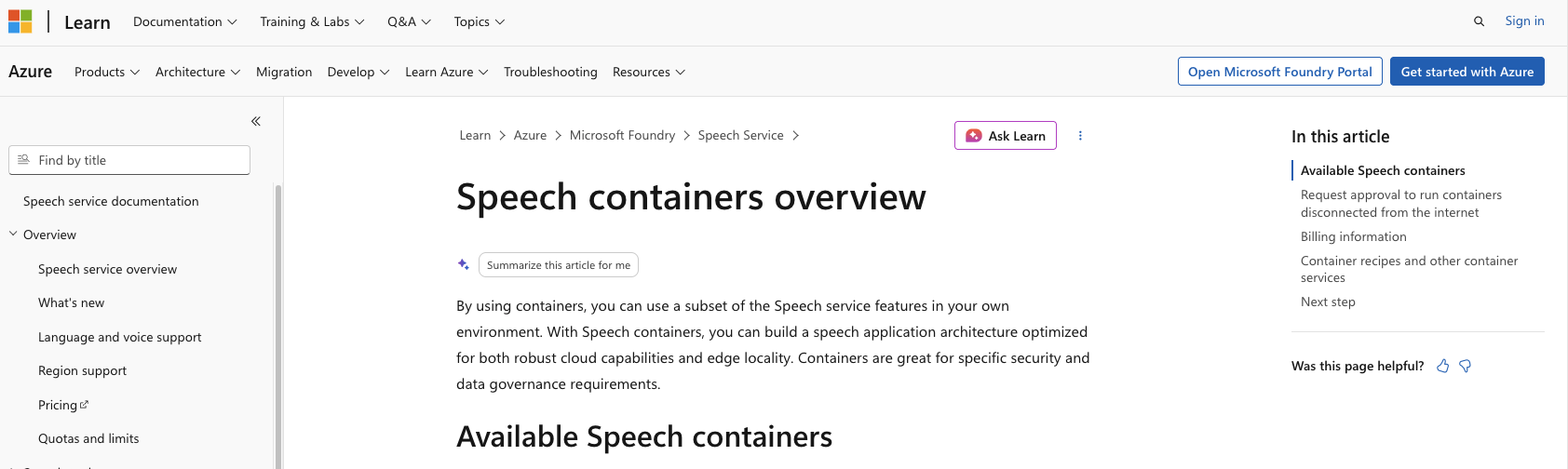
What it does: Delivers Azure's speech-to-text, custom speech, and neural TTS models as Docker containers you run on your own hosts.
Best for: Enterprises already inside the Microsoft ecosystem that need cloud-identical models behind their own firewall.
The containers pull from the Microsoft Container Registry and run on any x64 host, including on-prem servers, AKS, and Azure Stack. The disconnected mode is the differentiator, because it is a genuinely documented air gap from a hyperscaler.
Key Features
- Disconnected containers: Approved customers run speech containers with zero internet connectivity, licensed through a downloadable file.
- Custom model support: Custom speech models trained in the Speech portal deploy into containers, so domain tuning carries over to on-prem.
- Cloud parity: The same STT and neural TTS engines that power the Azure cloud endpoints ship in the container images.
Pros and Cons
Pros:
✅ The disconnected path is formal and documented, with a decision on the gating form within 10 business days.
✅ Containers run on plain Docker, which lowers the operational bar compared with GPU-first platforms.
✅ Kubernetes and Helm guidance ships in the official docs for scaled deployments.
Cons:
❌ Standard containers must stay connected to Azure for billing metering, and they refuse to run otherwise.
❌ Disconnected mode needs approval, a dedicated DC0 commitment plan, and for custom STT, two separate speech resources.
❌ Disconnected containers carry no SLA, because you control the host environment.
Pricing
Speech containers bill through your Azure resource, and disconnected pricing uses separate commitment tiers from standard containers. Model memory adds 4 to 8 GB of host RAM on top of the base requirements.
Bottom Line
If your enterprise agreement is already in Azure, these containers are the lowest-friction road to on-prem speech. Start the disconnected approval form the same day you start the evaluation, because the gate can be a challenge.
5. Cartesia: Best for Low-Latency TTS Across Cloud, On-Prem, and Device
What it does: Serves the Sonic TTS and Ink STT model families, with the same models deployable in the cloud, on your infrastructure, or on-device.
Best for: Voice agents where response speed is the binding constraint and the deployment target may change.
Cartesia's pitch is deployment symmetry. The same models run across cloud, on-premises, and on-device, so a stack validated in the cloud moves behind your firewall without a model swap.
Key Features
- Sub-90ms synthesis: Cartesia states sub-90ms time-to-first-audio for Sonic 3.6. That is vendor-measured model latency, so budget for the network and orchestration hops on top of it.
- Air-gapped deployment: The on-prem package covers models, inference engine, and orchestration with full air-gap support.
- State space model architecture: SSMs deliver low latency with long-context efficiency, the technical bet that separates Cartesia from Transformer-based rivals.
Pros and Cons
Pros:
✅ Compliance coverage spans SOC 2 Type 2, HIPAA, GDPR, and PCI, which shortens enterprise security review.
✅ Cloud, VPC, on-prem, and on-device share one API, so migration between levels avoids re-integration.
✅ Ink gives you streaming STT from the same vendor, trimming the pipeline to one contract.
Cons:
❌ DPAs and BAAs are Enterprise-only, with no self-serve compliance path.
❌ The ecosystem and community remain narrower than ElevenLabs, so fewer prebuilt integrations exist.
❌ On-prem access runs through sales, and public pricing covers cloud tiers only.
Pricing
Cartesia publishes four cloud tiers, from free up to Scale at $299 a month, each with a sign-up link. On-premises deployment sits in the Enterprise tier, which lists no price and routes to a contact form.
Bottom Line
Cartesia is the strongest TTS-first answer on this list, with model parity from cloud to device. Treat the vendor-published latency numbers as a starting claim and measure them in your environment.
6. Vapi On-Prem: Best for a Full Orchestration Platform in Your Cloud

What it does: Deploys Vapi's entire voice agent platform, orchestration, models, and telephony glue, dockerized inside your own cloud on your GPUs.
Best for: Product groups that want a managed-platform developer experience with call data confined to their own VPCs.
Vapi is the only orchestration platform here with a public on-prem doc. Audio and text data stay in your cloud, in any region, on any provider, and never pass through Vapi's servers.
Key Features
- Any-cloud packaging: The platform deploys in a Dockerized format on any cloud provider, in any geography.
- Audit-logged egress: All network traffic leaving the appliance lands in an audit log your security review can inspect.
- Marketplace path: An AWS Marketplace listing handles procurement and billing through your existing AWS account.
Pros and Cons
Pros:
✅ You keep the full Vapi developer experience, so agents built against the cloud API carry over.
✅ GPU resources auto-adjust to workload inside your account, per the service agreement.
✅ The Control VPC uses open-source components, so policy enforcement is inspectable.
Cons:
❌ The appliance regularly sends performance and usage data to Vapi for billing, so a full air gap is off the menu.
❌ Model machines sit in an isolated VPC you can't log into, which some security reviews will refuse.
❌ Self-hosting keeps the platform fee, so the base subscription stacks on top of your own infrastructure costs.
Pricing
On-prem is an enterprise product with the standard platform fee intact. The AWS Marketplace route bills through AWS at $0.05 per minute of call time, delivered as two Kubernetes clusters on Ubuntu 20.04.
Bottom Line
Vapi On-Prem solves data residency with the least engineering effort of anything on this list. Call it what it is, though. A connected private-cloud deployment with telemetry, so confirm with your auditor that it meets your specific residency requirement.
7. Open-Source Stack: Best for Zero-License-Fee Full Control
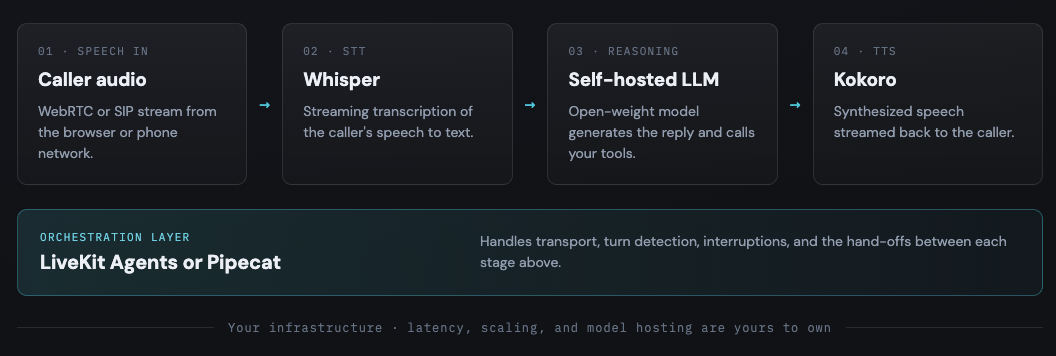
What it does: Assembles a complete voice pipeline from permissively licensed components, with orchestration, STT, TTS, and the LLM all under your control.
Best for: Engineering orgs with GPU ops experience that want an air gap by construction and no per-minute fees.
Every layer now has a credible open option. LiveKit Agents is Apache 2.0 with a self-hostable media server, and Pipecat ships under BSD-2-Clause for pipeline-level control.
Key Features
- Whisper for STT: The Whisper family is MIT-licensed, with whisper.cpp running down to Raspberry Pi-class hardware and faster-whisper speeding up GPU inference.
- Vosk for lightweight STT: Apache 2.0 models around 50 MB with streaming support across 20+ languages, scaling from a Raspberry Pi to a cluster.
- Kokoro for TTS: An 82M-parameter, Apache 2.0 model with 54 voices across 8 languages, fast even on CPU.
Pros and Cons
Pros:
✅ No licensing traffic exists to firewall off, so the air gap is a property of the architecture.
✅ A full pipeline fits on one GPU. Whisper Large v3 at about 4 GB, a 7B LLM around 14 GB at FP16, and Kokoro in 2 to 3 GB.
✅ Open-weight LLMs, including gpt-oss-20b, complete the reasoning layer on your hardware.
Cons:
❌ Streaming behavior and entity accuracy trail commercial APIs, since most open models were optimized for WER on batch audio.
❌ Every incident, upgrade, and accuracy gap is yours, with no vendor support line behind it.
❌ License diligence is per-checkpoint. Several popular TTS models carry non-commercial terms, and the license on the exact weights you deploy is the one that counts.
Pricing
The software costs nothing. The GPUs, the on-call rotation, and the accuracy tuning are the real price, and they compound with call volume.
Bottom Line
This stack is the only path to a fully open, fully air-gapped voice agent with zero license spend. Choose it when you have the engineers to own it, and skip it when you don't.
AssemblyAI and Picovoice: Two More Self-Hosted Options
Two vendors ship documented self-hosted speech products and sit just outside the ranked list. Check both if none of the seven above match your layer.
AssemblyAI Self-Hosted runs its speech-to-text models as containers on your infrastructure. One instance handles up to 48 concurrent streams. Deployment starts with a Docker Compose demo and moves to Kubernetes or AWS ECS for production.
It lands at Level 2 for most buyers. AssemblyAI supports GovCloud and countries with data sovereignty or hardware import restrictions, and positions self-hosting around latency and data residency. No zero-connectivity mode is documented.
Picovoice runs inference fully on-device. Leopard handles recorded audio, Cheetah handles streaming, and Orca covers text-to-speech, all under 40 MB and running on hardware down to a Raspberry Pi.
The catch puts it at Level 1. Picovoice states its engines call home to validate your AccessKey and check plan limits. Voice processing is offline, but licensing is not. Confirm air-gapping terms with Picovoice before you design around them.
Popular Voice AI APIs You Can't Run On-Premises
The absence list matters as much as the roundup, because two of the most popular voice APIs stay in the cloud. Knowing this early saves an evaluation cycle.
The OpenAI Realtime API runs over WebSocket connections to cloud endpoints, whether you reach it through OpenAI directly or an Azure OpenAI resource. Azure's GPT realtime models deploy in exactly two regions, East US 2 and Sweden Central.
Azure Voice Live follows the same pattern. It is a managed cloud service, and no on-prem SKU exists for it.
What On-Premises Voice AI Actually Costs
On-premises voice AI swaps a per-minute bill for a fixed monthly one. The hardware crossover arrives earlier than most teams expect. Headcount is what actually decides the total.
GPU Cost Versus Per-Minute Cloud Billing
Rent the GPU and the arithmetic is simple. An AWS g6.xlarge with one NVIDIA L4 runs about $0.80 an hour on demand in us-east-1, or roughly $588 a month if you leave it running.
Price that against cloud speech-to-text. Deepgram's standard price for Nova-3 Monolingual streaming is $0.0077 a minute, so that card pays for itself at about 76,000 minutes a month. Call it 1,270 hours of audio.
Spread across a month, 76,000 minutes is under two concurrent streams of continuous speech. A single card clears its own cost at modest volume.
Full voice agents cross over sooner. Deepgram's Voice Agent API Standard tier typically runs $0.075 per minute, which puts the same $588 GPU in the black at roughly 7,800 minutes a month.
Give yourself VRAM headroom for STT, LLM, and TTS on one box, and a g6e.xlarge at about $1,359 a month moves that to roughly 18,000 minutes.
The Ops Headcount That Decides the Total
Hardware is the cheap part. The Bureau of Labor Statistics put the median annual wage for software developers at $135,980 in May 2025, and an on-prem voice stack needs someone who has run GPU inference in production.
Run that salary against the GPU. At $588 a month, the card costs $7,056 a year, so one median engineer is worth about 19 of them.
So the hardware line clears early, and the salary line never does. That is the number your business case turns on.
What This Model Leaves Out
These figures model published list prices. They are illustrative, not a quote, and four costs sit outside them.
- Redundancy: One GPU is a demo. Production wants at least two, which doubles the hardware line.
- Owned hardware: Buying cards rather than renting them shifts spend into capex and changes the payback curve.
- The rest of the stack: Telephony, storage, networking, and monitoring all bill separately.
- Accuracy work: Closing the WER gap between open and commercial models is recurring engineering time.
Pricing verified against vendor pages on 1 September 2026. Run the same arithmetic against your own call volume before you commit.
How to Deploy a Voice AI API On-Premises
Deployment order matters more than vendor choice. The steps below front-load the decisions that get expensive to reverse.
- Pick your control level first: Map your actual compliance requirement to connected container, private cloud, or full air gap. Vendors qualify or disqualify themselves at this step, before any benchmark runs.
- Size the GPU layer: Deepgram wants dedicated NVIDIA GPUs, Ampere or newer for Flux. A pipeline of faster-whisper large-v3, a 7B LLM at FP16, and Kokoro fits on a single 24 GB card. Reference Whisper large needs about 10 GB on its own.
- Deploy with containers and a chart: Deepgram's Helm chart, Riva's quick start scripts, and Azure's docker run recipes each give you a repeatable install. Pin versions, because model and engine upgrades change behavior.
- Wire the telephony ingress: A SIP trunk has to terminate inside your network, feeding a transport layer like a self-hosted LiveKit or Pipecat deployment. This hop is where most first installs stall.
- Set a per-turn latency budget: On-prem removes internet round trips, then gives the time back to queuing if inference is under-provisioned.
Cekura's Voice Orchestration Benchmarks measured mean main-agent response times from 1.27s to 3.08s across seven orchestration configurations over 82 scenarios, so measure yours per turn, under load.
- Regression-test before cutover: Replay the same scenarios against the cloud stack and its on-prem replacement, and compare transcripts, tool calls, and latency side by side. A model swap that looks identical on paper rarely behaves identically on calls.
Which On-Premises Voice AI API Should You Choose?
The right choice depends on which layer you need on-prem and how absolute the air gap needs to be. If you match the tool to the constraint, most of the shortlist falls away.
Choose Deepgram Self-Hosted if you:
- Run Kubernetes today and want commercial STT accuracy on your own hardware.
- Can accept license-server metadata, or will route through SageMaker for the air gap.
Choose NVIDIA Riva if you:
- Deploy to edge or embedded targets with limited or zero connectivity.
- Want to fine-tune speech models on domain vocabulary with NeMo.
Choose Speechmatics if you:
- Transcribe multilingual, accented, real-world audio inside a sealed network.
- Prefer a virtual appliance over managing a container platform.
Choose Azure AI Speech Containers if you:
- Already hold an Azure enterprise agreement and want cloud-identical models.
- Have a documented disconnected requirement and time for the approval gate.
Choose Cartesia if you:
- Need TTS latency below 100ms and expect the deployment target to change.
- Want cloud, on-prem, and on-device on the same models and API.
Choose Vapi On-Prem if you:
- Want the full platform experience with call data confined to your VPCs.
- Can live with billing telemetry leaving the account.
Choose the open-source stack if you:
- Need a true air gap with zero license traffic and zero per-minute fees.
- Have the GPU ops experience to own accuracy, scaling, and incidents.
Skip on-prem entirely if:
- Your call volume is small, and no regulation forces the audio to stay local. Cloud APIs will be cheaper and faster to run.
- Nobody on staff has run GPU inference in production. The savings evaporate into operations.
Final Verdict
The question of which voice AI APIs can be deployed on-premises now has a real answer at every layer, from Deepgram's Helm chart to an all-open pipeline. My pick for most regulated deployments pairs Deepgram for STT with Cartesia for TTS.
The open-source stack is the ambitious alternative when a hard air gap is non-negotiable. The cloud still wins on iteration speed, and OpenAI's Realtime API proves plenty of buyers accept that trade. When your auditors won't, the seven options above are the market.
Test Your Voice Agent Where It Actually Runs
An on-prem stack passes the security review and then meets the same callers as everyone else, the ones who interrupt, mumble, and go off script. Cekura runs simulated callers against your agent over WebRTC, SIP, and websockets, so an agent behind your firewall gets tested like a cloud agent.
After 5M+ stress-tested minutes of voice agent conversations, the pattern is clear. The stack changes, and the caller chaos stays the same. Cekura covers the full lifecycle of an on-prem migration in three layers.
Pre-production:
- Thousands of simulated conversations against your on-prem agent before real traffic arrives.
- Red teaming that probes jailbreaks and data extraction on the stack your security review just approved.
Infrastructure:
- Interruption, background noise, and per-turn latency scoring that separates model regressions from GPU under-provisioning.
- Side-by-side runs of the same scenarios on a cloud API and its self-hosted replacement, before you commit the GPU budget.
Observability:
Production call QA with drop-off analysis, sentiment tracking, and tool-call tracing on every conversation.
Native integrations work out of the box for Retell, VAPI, ElevenLabs, LiveKit, Pipecat, Bland, and more, so the agent you deploy is the agent that gets tested.
Cekura supports SOC 2, HIPAA, and GDPR compliance, covering transcript redaction, role-based access, and audit trails.
Book a demo to see what your on-prem agent does on a call you never scripted.
Frequently Asked Questions
Can Whisper Be Deployed Fully On-Premises?
Yes, Whisper can be deployed fully on-premises because the entire model family is MIT-licensed with downloadable weights. Variants like whisper.cpp run on CPU-only hardware, and faster-whisper accelerates GPU inference, with no network call after the initial weight download.
Does On-Premises Deployment Reduce Voice AI Latency?
On-premises deployment can reduce voice AI latency by removing internet round trips between your telephony layer and the models. The gain disappears if inference is under-provisioned, because queueing delay replaces network delay.
Cekura's benchmarks measured mean response times from 1.27s to 3.08s across seven orchestration configurations, which is why per-turn measurement under load is the test that counts.
What GPUs Do You Need For On-Premises Voice AI?
On-premises voice AI typically needs dedicated NVIDIA GPUs, with Deepgram requiring Ampere-generation cards like the A10, L4, or A100 for its newest models. A complete open-source pipeline fits in under 25 GB of VRAM, and CPU-only options like Vosk and Kokoro exist for lighter workloads.
Is On-Premises Deployment Required For HIPAA Compliance?
No, HIPAA does not require on-premises deployment, since cloud vendors sign BAAs and hold certifications that satisfy auditors. On-prem is one way to shrink the compliance surface, and it trades that reduction for infrastructure you must secure and audit yourself.