
A Deepgram API key shows its secret exactly once, and a key with the wrong role rejects your first temporary-token request with a FORBIDDEN error. Get both decisions right in the console, and the rest of the setup is a paste and one test request.
TL;DR: How to Get a Deepgram API Key
- Create the key in the Deepgram Console under Manage, then API Keys, and copy the secret before you close the dialog
- Pick the role on purpose. Default-role keys handle server-side inference, and minting temporary tokens needs Member or higher.
- Treat the key like a password. Store it in environment variables, rotate it through the Management API, and delete it the moment it leaks.
| Credential | Lifetime | Where you create it | Best for |
|---|---|---|---|
| Console API key | A date, a duration, or no expiry | Deepgram Console | Your first key and server-side production traffic |
| API-created key | Until deleted or its creator leaves the project | Management API, called with an existing key | Scripted rotation and per-service keys |
| Temporary token (JWT) | 30 seconds by default, up to 1 hour | /v1/auth/grant endpoint | Browser and mobile clients |
| CLI profile | Same as the stored key | dg login | Local scripts and switching between environments |
What Is a Deepgram API Key?
A Deepgram API key is a secret string that authenticates your requests to Deepgram's speech-to-text, text-to-speech, and voice agent APIs. You send it in an Authorization header using the Token scheme, and every key belongs to one project.
New accounts start with $200 in credit and no credit card on file. After that credit runs out, usage bills at pay-as-you-go rates.
If you're still deciding whether Deepgram is the right speech layer, our list of ranked voice APIs compares it with the main alternatives.
What You Need Before Creating a Deepgram API Key
Have these five things ready:
- A Deepgram Console account. Sign-up is free and takes a few minutes.
- A target project. Keys can't move between projects, so decide whether this key belongs in your first project or a separate staging one.
- A role decision. Server-side transcription needs only the default role, and token minting needs Member or higher.
- A runtime for testing. cURL covers quick checks, and the Python examples need a recent Python 3 install.
- A secrets store. Pick a password manager, a git-ignored
.envfile, or your cloud secret manager before you create the key.
How to Get a Deepgram API Key in 6 Steps
You must create your first Deepgram API key in the Console. After that, the Management API can create more keys for scripts and rotation jobs.
1. Sign In or Create a Deepgram Account
Go to the Deepgram Console and sign in, or create an account if you're new. Deepgram builds your first project at sign-up and attaches your free credit to it.
2. Select a Project From the Top-Left Dropdown
Open the Projects dropdown in the top-left corner and pick the project that should own the key. A key works only inside the project that created it.
3. Open API Keys in the Left Sidebar
In the left sidebar, under Manage, select API Keys. This page lists every key in the project, and you can filter it by comment, creator, tag, identifier, or scope.
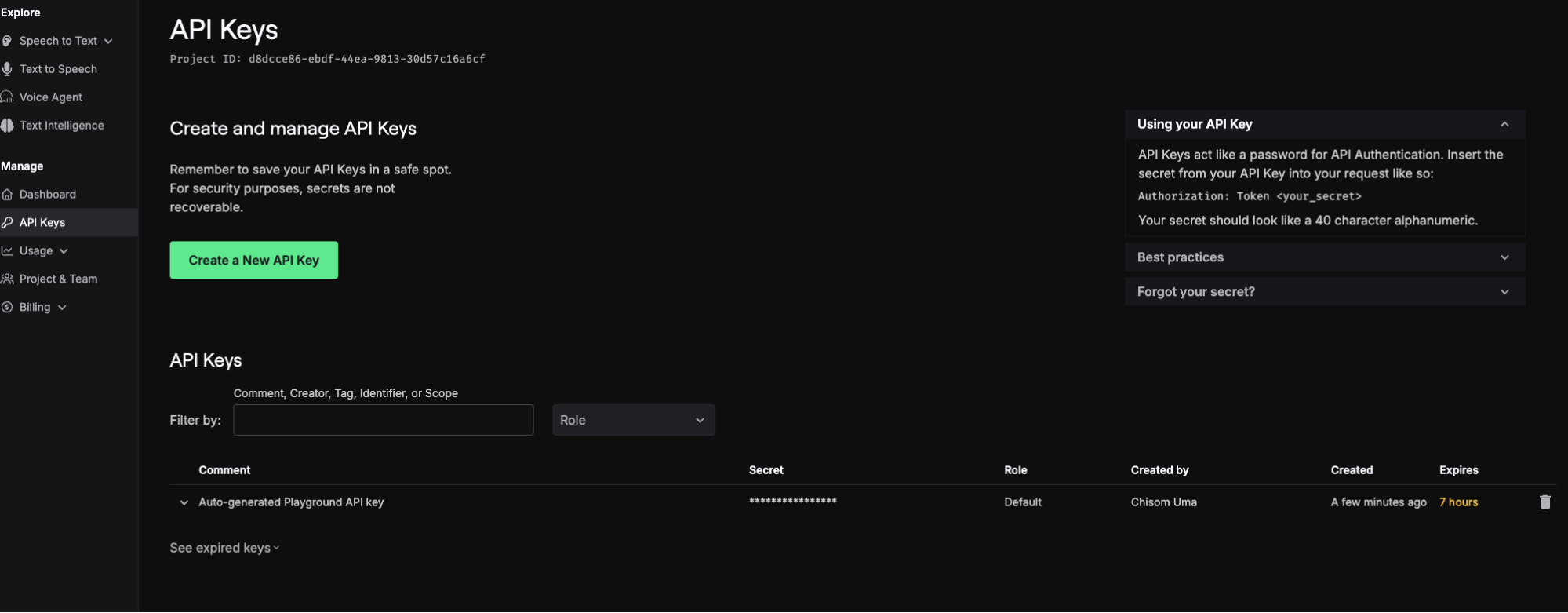
4. Click Create a New API Key
Select Create a New API Key. The Create an API Key dialog opens.
5. Name the Key, Set Its Expiration, and Choose a Role
- Name your key: Enter a friendly name, such as transcriber-prod, so you can find the key later.
- Set expiration: Choose Never, Duration, or Date.
- Advanced: Pick the key's role and add tags. Tags can't be changed after you create the key, and every request made with the key inherits them.
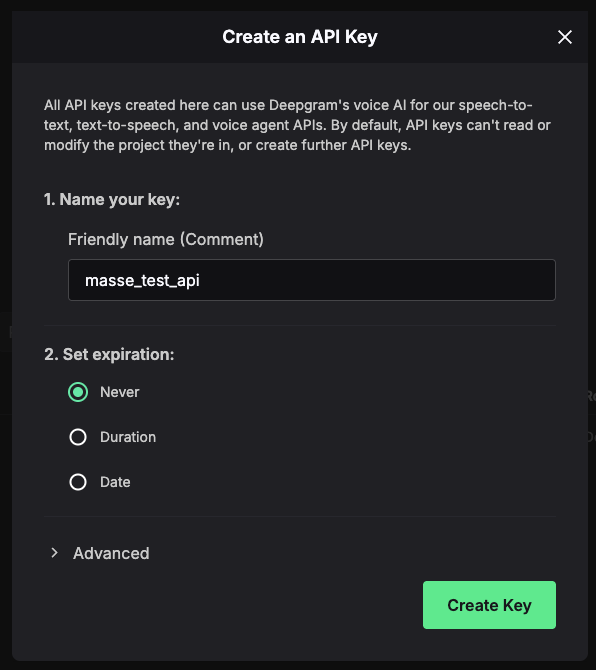
6. Click Create Key and Copy the Secret
Click Create Key. Deepgram generates the secret and shows it only once, so copy it into your secrets store before you close the dialog.
Deepgram API Key Roles and Permission Scopes
A role decides which endpoints a key can call inside its project. Deepgram defines three project roles, and a key created without one gets the default role, which has no management access.
Default, Member, Admin, and Owner Roles Compared
| Role | Key scopes | Other notable scopes | Can mint temporary tokens |
|---|---|---|---|
| Default | None | Inference requests only | No |
| Member | keys:read and keys:write, for keys they created | usage:read, usage:write, project:read, project:write | Yes |
| Admin | keys:read, plus keys:write for keys they created | Member and Admin management, billing:read | Yes |
| Owner | keys:read, keys:write | billing:write, project:write:destroy, Owner management | Yes |
Choosing a Role for Each Use Case
- Choose the default role if the key only sends audio or text from your backend. It can't read other keys, members, or billing.
- Choose Member if your server mints temporary tokens. The token endpoint rejects keys below Member with a
FORBIDDENerror. - Choose Member or Admin if a script creates and deletes keys. Creating keys through the API takes the admin role or the
keys:readandkeys:writescopes. - Choose Owner only for billing changes or project deletion. Keep Owner keys out of application code entirely.
How Deepgram Ties Each API Key to a Project and Its Creator
Every Deepgram key has two anchors. The project controls product access and billing, and the person who created the key owns it.
Remove the creator from the project, and every key they made stops authenticating, including keys serving production traffic. The rule exists so former staff can't keep API access.
Roles cap keys too. A key's permissions can't exceed its creator's role, so demoting an Owner to Admin strips Owner rights from every Owner-scoped key they created.
Create production keys from a shared service account, such as an engineering mailbox. Give every project at least two Owners, so someone can still manage keys when one Owner leaves.
Offboarding a Developer Without Disabling Production Keys
- Find their keys. Filter the API Keys page by the person's name or email, and note each Key ID.
- Create replacements. Match each old key's role and tags, ideally from the service account.
- Redeploy the new secrets. Update environment variables, CI/CD secrets, Kubernetes secrets, and any third-party tool that calls Deepgram for you.
- Confirm traffic moved. In Usage > Logs, filter by each old Key ID across the last 7 days and look for zero requests.
- Remove the person. Deepgram disables their remaining keys the moment you confirm.
Wait a full week before step five. Weekly cron jobs and other low-frequency callers can sit idle for days, then hit a disabled key. Watch longer if a monthly job touches Deepgram.
How to Test a Deepgram API Key With Your First Request
Run these checks from a terminal before wiring the key into an app. Load the key into your shell once with read, which keeps it out of your shell history.
read -rs DEEPGRAM_API_KEY && export DEEPGRAM_API_KEY
Validate the Key With the /auth/token Endpoint
A GET request to /v1/auth/token returns key details for a valid key and an invalid-credentials error for a bad one. Always call the https:// endpoint, since calls over plain HTTP fail.
curl https://api.deepgram.com/v1/auth/token \
  -H "Authorization: Token $DEEPGRAM_API_KEY"
Transcribe a Sample File With cURL
This request sends Deepgram's hosted sample clip to the nova-3 model with smart formatting on. A JSON response containing a transcript field confirms the key works for speech-to-text.
curl --request POST \
  --header "Authorization: Token $DEEPGRAM_API_KEY" \
  --header "Content-Type: application/json" \
  --data '{"url":"https://static.deepgram.com/examples/interview_speech-analytics.wav"}' \
  --url "https://api.deepgram.com/v1/listen?model=nova-3&smart_format=true"
Call Deepgram From the Python SDK
Install the SDK with pip. The current release requires Python 3.10 or newer. Deepgram also ships SDKs for JavaScript, .NET, Go, and Java.
The client reads DEEPGRAM_API_KEY automatically, so the key never appears in your source code.
pip install deepgram-sdk
from deepgram import DeepgramClient
# Picks up DEEPGRAM_API_KEY from the environment
client = DeepgramClient()
response = client.listen.v1.media.transcribe_url(
    url="https://static.deepgram.com/examples/interview_speech-analytics.wav",
    model="nova-3",
    smart_format=True,
)
print(response.results.channels[0].alternatives[0].transcript)
Copy examples from the current SDK only. Version 2.x code calls transcription.prerecorded(), and version 5.0 moved transcription under listen.v1.media.
Authenticate the Deepgram CLI With Named Profiles
The dg CLI stores keys in your OS keyring when one is available, which keeps secrets out of dotfiles. Named profiles let one machine hold a development key and a production key side by side.
dg login --profile development
dg login --profile production
dg --profile development listen audio.mp3
dg whoami
dg whoami prints the active profile, a masked key, the credential source, and the project ID. Run it before any production command to confirm which key you're about to spend.
With a working key, the next job is wiring Deepgram into the speech layer of a full voice assistant build, from dialogue design to deployment.
Short-Lived Deepgram Tokens for Browser and Mobile Apps
An API key shipped in client-side code belongs to anyone who opens DevTools. Mint a temporary token on your server and send only that token to the browser or app.
Temporary tokens are JWTs that last 30 seconds by default. Create them at connection time, right before the client opens its request.
For mobile clients on slow networks, pass ttl_seconds to stretch a token to a maximum of 3,600 seconds. Keep the TTL as short as your client allows.
curl -X POST https://api.deepgram.com/v1/auth/grant \
  -H "Authorization: Token $DEEPGRAM_API_KEY"
The response carries an access_token and an expires_in value. The client sends that token in an Authorization: Bearer header on its Deepgram requests.
import os
from deepgram import DeepgramClient
# Server side: the long-lived key never leaves this process
server = DeepgramClient(api_key=os.environ["DEEPGRAM_API_KEY"])
grant = server.auth.v1.tokens.grant(ttl_seconds=60)
# Return grant.access_token to your client over your own authenticated API
Tokens only cover inference. They carry usage:write access for /listen, /speak, /read, and /agent, and every Management API call rejects them.
A WebSocket opened with a valid token stays connected after the token expires. A 30-second token can open a streaming session that stays live until you close it.
Skip API-created temporary keys for this job. Deepgram caps how many keys you can create through the API each day, and tokens have no such cap.
Streaming voice apps rely on this pattern most, and our comparison of real-time audio APIs weighs latency across providers.
How to Secure, Rotate, and Revoke a Deepgram API Key
This section shows you how to store, rotate, and revoke a Deepgram API key.
Storing the Key in Environment Variables and CI Secrets
Store the key in one of these places:
- A local
.envfile listed in.gitignore - Your cloud provider's secret manager
- Your CI platform's encrypted secrets store
# .env (git-ignored)
DEEPGRAM_API_KEY=your_key_here
echo ".env" >> .gitignore
In GitHub Actions, the CLI reads the key from repository secrets at runtime. The secret never lands in the workflow file.
- name: Transcribe audio
  env:
    DEEPGRAM_API_KEY: ${{ secrets.DEEPGRAM_API_KEY }}
  run: dg -o json listen audio.mp3 > transcript.json
Use separate keys for testing and production. Revoking a leaked staging key then leaves production running.
Rotating Keys With the Deepgram Management API
Rotation is two API calls and a deploy. Create the new key, ship it, confirm the old key is idle, then delete it. Grab your project ID from dg whoami.
# 1. Create the replacement key
curl --request POST \
  --url "https://api.deepgram.com/v1/projects/$DEEPGRAM_PROJECT_ID/keys" \
  --header "Authorization: Token $DEEPGRAM_ADMIN_KEY" \
  --header "Content-Type: application/json" \
  --data '{"comment": "transcriber-prod-2026-09", "scopes": ["usage:write"]}'
# 2. Deploy the new secret, then watch Usage > Logs for the old Key ID
# 3. Delete the old key once it shows no traffic
curl --request DELETE \
  --url "https://api.deepgram.com/v1/projects/$DEEPGRAM_PROJECT_ID/keys/$OLD_KEY_ID" \
  --header "Authorization: Token $DEEPGRAM_ADMIN_KEY"
Write the secret from the create endpoint response straight into your Secret Manager. The delete endpoint takes the project ID and the old Key ID.
Put rotation on a calendar. Periodic rotation limits exposure and keeps the runbook fresh for the day a key leaks.
Scanning Commits for Leaked Deepgram Keys
GitHub has no Deepgram-specific detector. Deepgram is absent from GitHub's supported secret patterns, so no provider alert or partner notification fires for these keys.
TruffleHog's Deepgram detector covers it. It matches 40-character strings near the word "deepgram" and confirms each hit with a live call to Deepgram's API.
trufflehog git file://. --results=verified,unknown
Run the scan in CI and as a pre-commit hook. A key caught before push never reaches a remote, which makes the local hook the cheaper catch.
Deepgram API Key Leak Response Checklist
Leaked keys tend to stay valid for years. Of the credentials GitGuardian confirmed as valid in 2022, more than 64% still worked when it retested them in January 2026.
If a Deepgram key leaks, work through this order:
- Delete the key. Use the trash icon on the API Keys page, or call the delete endpoint.
- Issue a replacement. Create it from a service account with the smallest role that does the job.
- Redeploy everywhere the old secret lived. Check app config, CI secrets, container secrets, and integrations that call Deepgram for you.
- Review usage. Filter Usage > Logs by the leaked Key ID to see what ran while it was exposed.
- Purge the secret from git history. A new commit that deletes the file leaves the key readable in every earlier commit.
Deleting first causes a short outage on anything still using that key. For a public leak, that trade is worth it, because anyone holding the key can run requests billed to your project.
Common Deepgram API Key Errors and Fixes
Each error below maps to one cause, usually a mistyped secret, a role below what the endpoint needs, or a change to the key's creator.
| Symptom | Likely cause | Fix |
|---|---|---|
Invalid-credentials error from /v1/auth/token | Mistyped, deleted, or truncated key | Re-copy the secret from your vault, or create a new key |
FORBIDDEN with "Insufficient permissions." from /v1/auth/grant | The key has the default role | Create a key with Member or higher |
Request to an http:// URL fails or times out | Deepgram accepts HTTPS only | Point the client at https://api.deepgram.com |
| A working key suddenly stops authenticating | Its creator left the project, or its expiration date passed | Create a replacement from a service account and redeploy |
| Owner-level calls start returning permission errors | The key's creator was demoted | Recreate the key from an account that holds the needed role |
| Management API rejects a request made with a token | Temporary tokens only cover inference endpoints | Use an API key with the right role for management calls |
How Cekura Tests Voice Agents Running on Your Deepgram API Key
A working Deepgram API key confirms authentication. Transcription accuracy on real callers, latency under load, and how your agent reacts to a misheard word are separate questions, and they need their own tests.
Cekura runs those tests with automated call simulations and production monitoring, the same approach behind our automated voice QA checklist.
Pre-production:
- Accent testing: Simulated callers with regional and non-native accents expose speech recognition misses before a real caller hits them.
- CI regression gate: Cekura's GitHub Action reruns your agent tests on every pull request and fails the check if any test fails, so a model swap or config edit gets caught before merge.
Infrastructure:
- Infrastructure suite: Pre-built scenarios check latency, stability, and error handling across your voice stack.
Observability:
- PII redaction: Cekura redacts the sensitive fields you configure from both transcripts and call recordings.
- Deep Research: Call audits scan a window of production calls for problems no metric covers, ranked by urgency, with suggested fixes and example calls.
Cekura is SOC 2-, HIPAA-, and GDPR-compliant, with PII redaction for transcripts and recordings, plus role-based access control and audit logs on Enterprise plans.
Native integrations work out of the box for Retell, Vapi, ElevenLabs, LiveKit, Pipecat, Bland, and more. You add a testing and monitoring layer on top of the stack you already run.
Book a demo to run a scenario suite against the voice agent your new Deepgram key powers.
Frequently Asked Questions
Is a Deepgram API key free?
Yes, a Deepgram API key is free to create, and new accounts receive $200 in credit with no credit card required. Usage beyond that credit bills at pay-as-you-go rates.
Can I view my Deepgram API key again after creating it?
No, Deepgram shows the key secret only once, at creation. If you lose it, create a new key, deploy it, and delete the old one.
Does a Deepgram API key expire?
A Deepgram API key expires only if you set an expiration date or duration when you create it. A key also stops working when its creator leaves the project, and temporary tokens expire after 30 seconds by default.
What is the difference between a Deepgram API key and a temporary token?
The main difference between a Deepgram API key and a temporary token is lifespan and reach. An API key is a long-lived secret that can call management endpoints if its role allows.
A temporary token lasts 30 seconds by default and works only with inference endpoints like /listen, /speak, /read, and /agent.
Why does my Deepgram API key return a Forbidden error?
Your Deepgram API key returns a Forbidden error when its role lacks a permission the endpoint requires. The /v1/auth/grant token endpoint, for example, rejects keys below the Member role.