
LiveKit has become one of the most popular frameworks for building real-time voice AI agents. It gives developers the flexibility to compose their own agent stack by combining speech recognition, LLM reasoning, tools, and text-to-speech into a streaming conversational system.
But building the agent is only half the challenge.
Once agents move beyond local experimentation, teams quickly face two critical questions:
- How do we test agents reliably before deployment?
- How do we monitor real conversations in production to ensure the system behaves correctly?
Cekura solves this full lifecycle problem for conversational AI teams. With Cekura, you can:
- run automated simulation calls to test agent behavior before release
- monitor live production conversations to detect issues early
- analyze conversations using built-in and custom metrics
- build dashboards and alerts for ongoing monitoring
For teams building agents on LiveKit, this workflow is now easier than ever using the Cekura tracing SDK, which automatically captures the data needed for both testing and production observability.
The Challenges of Debugging LiveKit Agents
LiveKit provides powerful tools for building real-time voice agents, including session insights, transcripts, and recordings. These tools are very useful when debugging an individual call.
However, as soon as agents start handling hundreds or thousands of conversations, teams encounter several practical challenges.
- Session-level visibility: LiveKit insights focus primarily on individual sessions. While this is useful for inspecting a specific call, it becomes difficult to understand patterns across many calls.
- Reactive debugging: Many teams only discover issues after customers report them. By the time a problem surfaces, multiple conversations may already have been affected.
- Difficulty identifying problematic calls: Without aggregated metrics or system-level monitoring, it is hard to know which calls failed, which calls experienced latency spikes, or which conversations went off-track.
- Hidden infrastructure and latency issues: Latency in speech recognition, LLM response time, or backend tools may degrade the user experience without being immediately obvious.
- Testing agents with backend dependencies: Agents that rely on external tools and APIs can be difficult to test reliably, especially when backend data changes or APIs behave unpredictably.
These challenges make it difficult to operate voice AI agents with confidence at scale.
Cekura addresses these problems by combining simulation testing and production observability, powered by detailed trace data.
Integrating Cekura with Tracing
Cekura already supports simulation and testing for a wide range of conversational AI platforms. Developers can run tests by:
- placing calls to an agent's telephony endpoint, or
- directly creating LiveKit rooms and connecting to agents using their LiveKit credentials.
With the introduction of the Cekura tracing SDK, integrating LiveKit agents with Cekura becomes even simpler.
By adding a light-weight SDK integration to your agent, you can automatically send detailed trace information to the Cekura platform. This includes:
- audio recordings of the conversation
- the full transcript
- LLM interaction traces
- tool call requests and responses
- session metadata
When a LiveKit session finishes, the full conversation data becomes available in Cekura for analysis.
These traces power two major capabilities:
- production observability: automatically monitoring how agents behave across real calls
- simulation testing: running automated test scenarios with detailed trace evaluation
Observability for LiveKit Agents
One of the biggest benefits unlocked by tracing is the ability to monitor production calls at scale.
Instead of manually inspecting individual sessions, teams can analyze trends across thousands of conversations and quickly detect when something goes wrong.
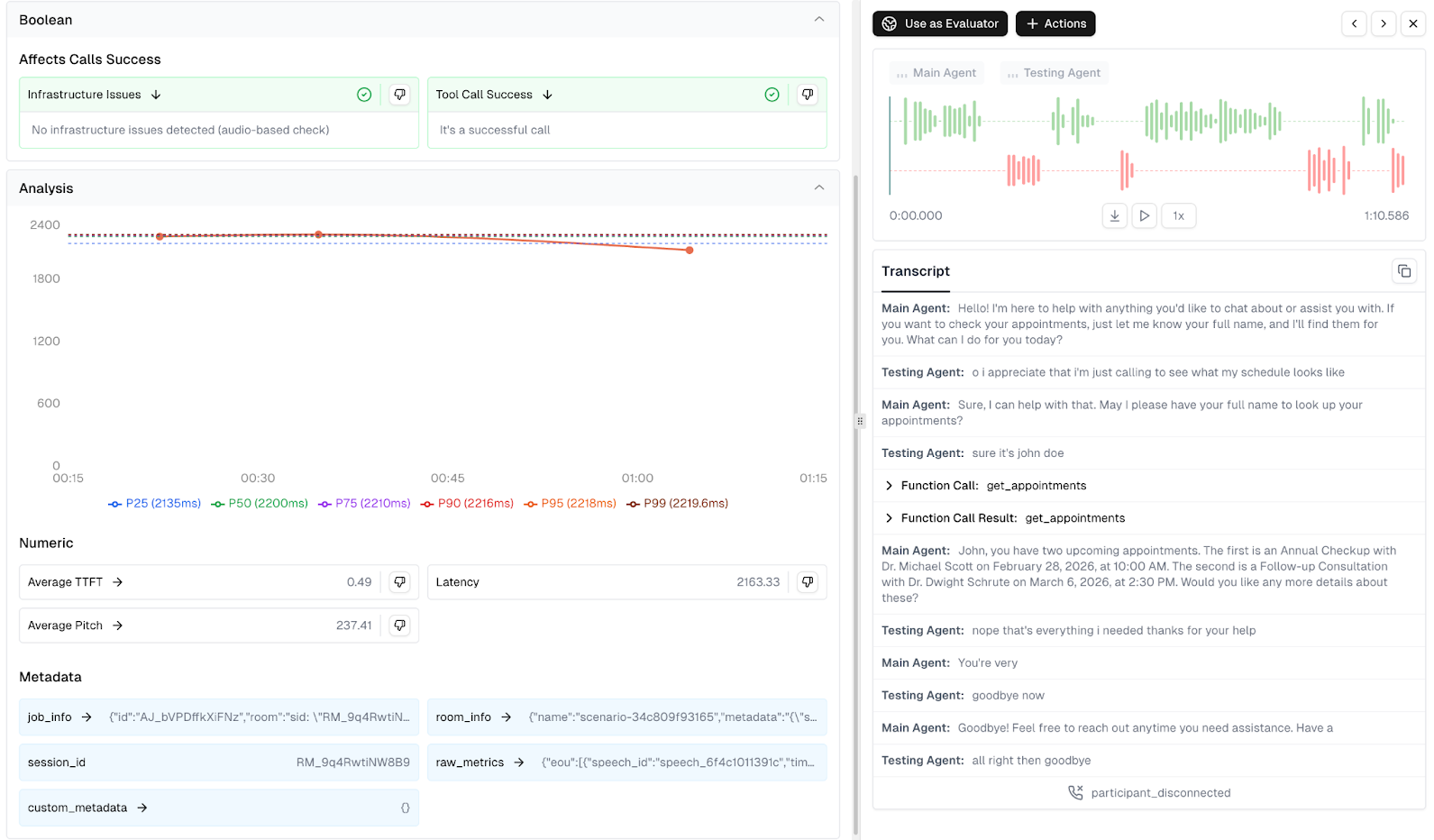
With tracing enabled, every completed LiveKit session sends its data to Cekura. This allows teams to inspect conversations in detail while also analyzing behavior across the entire system. Rather than searching through logs or waiting for user complaints, teams can proactively detect issues and investigate the underlying cause.
Metrics and Insights from Trace Data
Once LiveKit session traces are captured in Cekura, the platform automatically evaluates conversations using a set of predefined monitoring metrics designed specifically for conversational AI systems. These metrics help teams quickly understand how their agents perform across real production calls.
Cekura provides predefined metrics which cover:
- Conversation Quality & Correctness – evaluates whether the agent is behaving correctly in conversations, including signals like hallucination detection, response relevance, sentiment, and overall task success.
- Technical Performance & Reliability – monitors infrastructure and integration health, including latency patterns, tool call success, transcription accuracy, and other system reliability indicators.
- Conversation Flow & Dynamics – analyzes interaction behavior such as interruptions, talk ratios, and overtalk, and overall dialogue structure.
- Voice Quality & Delivery – evaluates the spoken experience, including voice clarity, pronunciation, speaking pace, and other audio quality indicators.
For a deeper explanation of these monitoring strategies, see our blog on monitoring AI chat and voice agents in production.
In addition to these built-in evaluations, the trace data captured by the Cekura tracing SDK enables teams to build custom metrics tailored to their agent workflows. These metrics can be implemented either using LLM-based evaluation or custom Python logic operating on transcripts, tool calls, and trace metadata.
Examples of useful custom metrics include:
- Time to first token – measure how quickly the LLM begins responding after user input.
- Transcription delay – track how long speech recognition takes to convert audio into text.
- Tool latency tracking – measure the legitimacy of external APIs or backend tools used by the agent.
- Workflow completion checks – verify whether the agent successfully completes tasks such as bookings, verifications, or information retrieval.
- Custom conversation rules – enforce domain-specific constraints such as compliance checks, script adherence, or required information capture.
By combining built-in monitoring metrics with custom trace-based metrics, teams can create dashboards and alerts tailored to the specific performance and reliability requirements of their voice AI agents.
Dashboards and Alerts
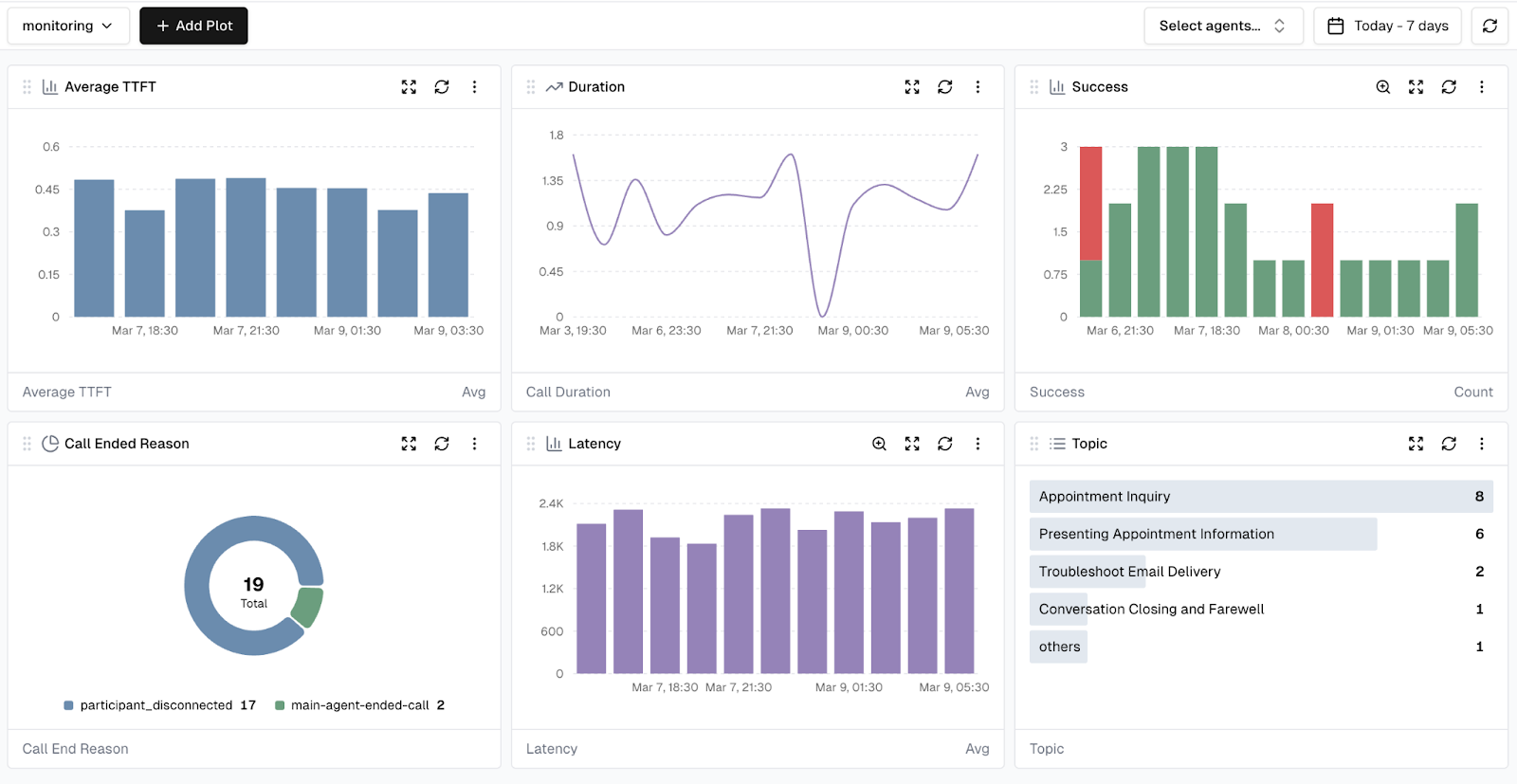
Once metrics are defined, they can be visualized through customizable dashboards in Cekura. These dashboards help teams track trends over time, filter conversations based on specific conditions, and quickly identify outlier calls or performance regressions across production traffic.
Teams can also create alerts based on metric thresholds.
For example:
- alert if tool call success rate drops below a defined threshold
- alert if latency exceeds acceptable limits
- alert if conversation quality scores degrade
This enables proactive monitoring of voice agents in production. Instead of reacting to problems after customers report them, teams can detect and resolve issues early.
Simulation Testing for LiveKit Agents
Cekura also enables automated simulation testing, allowing teams to validate agent behavior before deploying changes to production. Using structured test cases with defined user scenarios, goals, and expected outcomes, Cekura can run parallel simulation calls against your agent. These simulations can be executed in two ways for LiveKit agents:
Telephony testing
Cekura can place calls directly to your agent's phone number, testing the full production stack end-to-end.
LiveKit room simulations
Alternatively, Cekura can create LiveKit rooms and connect a simulated user agent directly to the system using your LiveKit credentials.
When tracing is enabled, simulations in both modes capture detailed trace data, including tool calls and reasoning steps. This allows deeper analysis of how the agent behaved during each test run.
Mock Tools for Deterministic Testing
Many voice agents rely on external backend systems such as databases, CRMs, or booking APIs. Testing these integrations can be challenging because backend data changes over time or external services may behave unpredictably.
Cekura addresses this with mock tools.
Instead of calling real backend services during simulations, tool calls can be automatically redirected to mock endpoints configured in Cekura. These mock tools return predefined responses, allowing tests to run in a fully controlled environment.
This approach provides several benefits:
- deterministic and repeatable test results
- no dependency on backend infrastructure
- easier simulation of edge cases
- faster test execution
When the tracing SDK is integrated, tool calls are automatically captured and can be replaced with mock responses when simulations are executed.
This makes it easy to focus on testing agent logic and conversation behavior, without needing to manage complex backend test setups.
Conclusion
Operating voice AI agents in production requires more than just building a working conversational pipeline. Teams also need reliable ways to test their systems and monitor real user interactions.
Cekura enables this workflow by combining:
- automated simulation testing
- production call observability
- detailed conversation tracing
- built-in and custom metrics
- dashboards and alerts
With the Cekura tracing SDK, LiveKit agents can now integrate seamlessly into this workflow. Traces from each session automatically power both deep production monitoring and rich simulation testing, helping teams detect issues early and continuously improve their agents.
As voice AI systems become more complex and more widely deployed, having strong testing and observability infrastructure becomes essential. Tracing provides the foundation for both and enables teams to operate their agents with confidence at scale.
Want to Learn More?
Start a free trial: https://dashboard.cekura.ai/dashboard
Book a demo: https://www.cekura.ai/expert