
TL;DR: Most call analytics stops at a pass/fail dashboard. It tells you 30% of your calls failed, not why, and definitely not which single fix would recover the most of them. Cekura Insights reads every failing call, groups them by root cause, and hands you a short list of distinct failure modes, each with the example calls behind it. You fix one thing per mode instead of investigating every call.
Good call analytics should answer one question: if I only have time to fix one thing this week, which fix recovers the most calls? A wall of percentages can't do that. This is the gap Cekura Insights was built to close.
Why pass/fail metrics tell you the score, not the story
Once a voice agent is live, the volume problem flips. In testing you ran a few dozen scenarios and read every transcript. In production you are getting thousands of calls a day, and your evaluation metrics collapse all of that into numbers: "Booking Completion: 71%. Latency p95: 2.4s."
That leaves the questions that actually matter unanswered:
- The 29% of calls that didn't complete a booking: did they fail for one reason or twelve?
- Is this a prompt problem, a tool problem, or an infrastructure problem?
- If I only have time to fix one thing this week, which fix recovers the most calls?
The only reliable way to answer those by hand is to open failing calls one at a time and read the transcripts. That works at 20 calls. It does not work at 2,000. So teams either guess at the root cause from gut feel, or they sample a handful of calls and hope the sample is representative. Both approaches quietly leave most of the failure surface unexplored, and the failure that's actually costing you bookings is often not the one that happened to sit on top of the list.
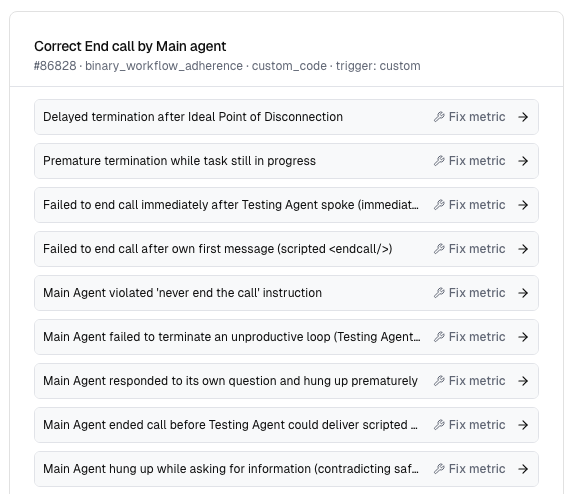
The core insight is simple: failures aren't random, they cluster. A hundred failed bookings are usually five or six recurring mechanisms repeated twenty times each. Name those mechanisms and you've turned an unbounded reading task into a short, fixable to-do list. That is a form of root cause analysis applied to voice calls, and it's exactly the job Insights does automatically.
How Insights does call analytics under the hood
1. Start from the failures, not the transcripts
Insights pulls every call in your chosen window where the metric failed, not a sample, the full set. For each one it already has the evaluator's verdict and the explanation of why that call failed. It starts from "here is why each of these calls was marked a failure" and works upward into patterns.
2. Cluster failures into modes, one fix per mode
The system hands an LLM agent a structured knowledge base of all the failing calls: an index it can scan efficiently, plus the per-call detail (transcript and verdict, or the triage writeup) it can drill into. The agent's job isn't to summarize, it's to cluster, under one governing rule:
Would a single fix resolve this for every call in the group?
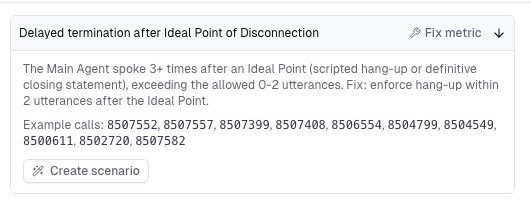
If yes, those calls belong to the same failure mode. If no, they stay in separate groups. If a call has two independent things wrong with it, it shows up in two modes. Each mode comes back with a title, a plain-English explanation of the mechanism, and the list of example calls that exhibit it.
That "one fix per mode" framing is what makes the output actionable instead of merely descriptive. A theme like "users got frustrated" is true and useless. A mode like "agent asks for date of birth before confirming the caller's identity, so callers refuse and drop" tells you exactly what to change, and shows you the twenty calls it will fix.
What you actually get from it
| You get | Instead of |
|---|---|
| A few named failure modes per metric | A queue of hundreds of individual calls |
| The real example calls behind each mode (evidence, not vibes) | A summary you have to take on faith |
| Root cause: a log-grounded timeline for technical failures, the mechanism for behavioral ones | A symptom-level label like "low CSAT" |
Because every mode carries its real example calls, you can verify the pattern in seconds and estimate how many calls a fix would recover. This is the layer that sits on top of standard AI conversation monitoring metrics: the metrics tell you a number moved, Insights tells you why and what to do about it.
Try it
If you're running a voice agent in production and your dashboard is a wall of percentages, Insights is the call analytics layer that turns those percentages back into a to-do list. It pairs naturally with Cekura's approach to monitoring AI voice agents in production.
FAQ
What is call analytics for voice agents?
It's the practice of analyzing production call data to understand how a voice agent is performing. Basic call analytics reports pass/fail rates and metrics; deeper call analytics, like Cekura Insights, groups failing calls by root cause so you know which fix recovers the most calls.
How is this different from my existing metrics dashboard?
A dashboard tells you the score (for example, 71% booking completion). It doesn't tell you why the other 29% failed or which single change would fix the most of them. Insights reads the actual failing calls and clusters them into named failure modes with example calls attached.
Do I have to read every failing call myself?
No. That's the point. Reading transcripts one by one works at 20 calls and breaks down at 2,000. Insights does the clustering across the full set of failures, so you review a short list of modes instead of an endless queue.
What counts as a "failure mode"?
A failure mode is a group of calls that a single fix would resolve. If one change would fix every call in the group, they're one mode. If not, they stay separate. A call with two independent problems appears in two modes.